
Scene Overview
Configuration
The structure of a scene’s components is defined by a scene configuration.
defines scene role and delegate class
optional attributes:
name
storyboard
UIScenesubclass
Can be declared either in the
Info.plistor can be created at runtime
Content
represented by an
NSUserActivityThese activities are used for requesting scenes as well as for state restoration
Scene management
managed by a scene delegate
the delegate is responsible for:
setting up the UI
responding to lifecycle events
saving and restoring state.
Scene tracking
tracked by
UISceneSessionscenes can be disconnected and reconnected by the system when it’s in the background
the scene session tracks the scene regardless of its connection state and persists between (scene) launches
A scene session can be thought of as the representation in the system app switcher:
Each item in the switcher corresponds to a scene session.
Scene request options
When requesting a scene from the system, you can provide an options object for customizing the request.
new in iPadOS 15,
UIWindowScene.ActivationRequestOptionsoffers new options subclass specifically for window scenesUsing this subclass allows you to specify a presentation style (
UIWindowScene.PresentationStyle(.prominent,.standard,.automatic)
Prominent presentation
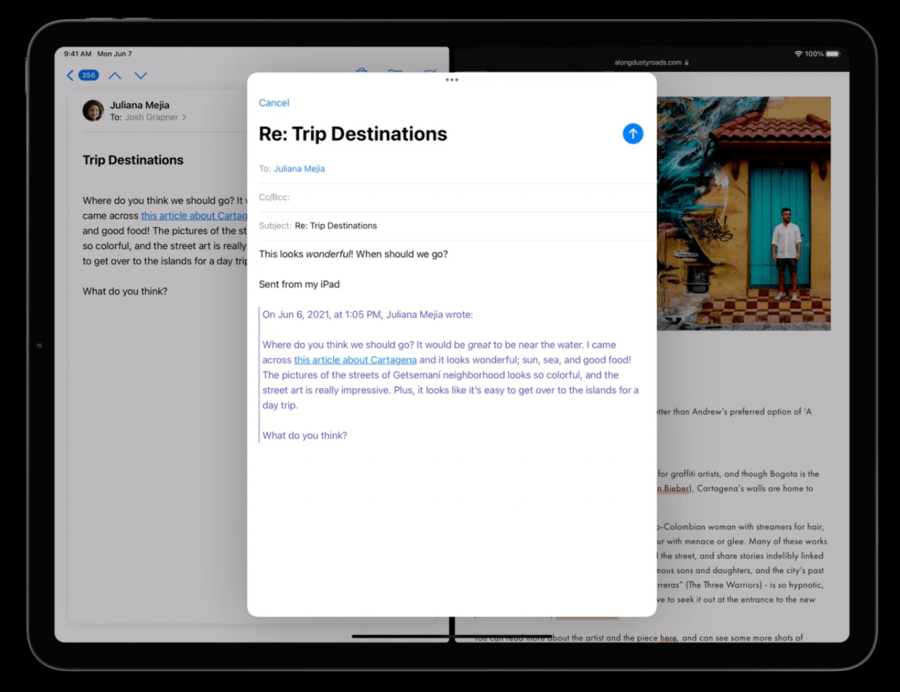
new style
presented modally in the current workspace with the scenes behind it dimmed.
this presentation should provide
Cancel,Close, orDonebuttonscan be re-positioned like any other scene
this presentation should be dedicated to specific content within your app like a document or file.
this dedicated content scope must be defined in the scene’s activation conditions (
UISceneActivationConditions)
Window scene activation action
to be used in menus, buttons, and bar button items
defaults to prominent style
provides title and image
let newSceneAction = UIWindowScene.ActivationAction({ _ in

  // Create the user activity that represents the new scene content.
  let userActivity = NSUserActivity(activityType: "com.myapp.detailscene")

  // Return the activation configuration.
  return UIWindowScene.ActivationConfiguration(userActivity: userActivity)
})

// Add the action to the menu.
let menu = UIMenu(children: [
  newSceneAction,
  flagAction,
  shareAction
])
on iPhone this action is automatically hidden
an alternate action can be provided on the
ActivationActioninitialization
Open scenes via gesture
requires prominent style
Two ways:
new
UICollectionViewDelegatemethod
func collectionView(
  _ collectionView: UICollectionView,
  sceneActivationConfigurationForItemAt indexPath: IndexPath,
  point: CGPoint
) -> UIWindowScene.ActivationConfiguration? {

  // Get the item's user activity.
  guard let itemActivity = <#User Activity#> else {
    // Return nil if item can’t be opened in a dedicated scene.
    return nil
  }

  // Return the activation configuration.
  return UIWindowScene.ActivationConfiguration(userActivity: itemActivity)
}
// Create an activation interaction.
let newSceneInteraction = UIWindowScene.ActivationInteraction { interaction, point in
  // Get the activity for specific point in view.
  guard let userActivity = <#User Activity#> else { return nil }

  // Return an activation configuration.
  return UIWindowScene.ActivationConfiguration(userActivity: userActivity)

} errorHandler: { error in
  // Present the content in another manner.
  <#Present Content#>
}

// Add interaction to the view.
<#View#>.addInteraction(newSceneInteraction)
QLPreviewSceneActivationConfiguration
special scene for displaying files
system-managed (no need for delegate, or callbacks to worry about)
Scene state restoration
can restore interaction states of textfields via new
interactionStatepropertyNew in iPadOS 15, there’s a new callback dedicated to state restoration
scene(_:restoreInteractionState:)called after the scene is connected and the storyboard has been loaded, but before the first transition to foreground
Extending state restoration
iPadOS 15 allows your app to request a short-term extension
During this extension, the launch image will remain visible while still allowing the main RunLoop to execute
app must signal when complete (app will be terminated otherwise)
func scene(_ scene: UIScene, restoreInteractionState stateRestorationActivity: NSUserActivity) {
  guard let viewController = window?.rootViewController as? <#Expected View Controller Class#> else { return }

  // Request an extension.
  scene.extendStateRestoration()

  // Fetch content asynchronously.
  <#self.someAsyncFunction#> { result in
    <#Restore Content#>

    // Signal that state has been restored.
    scene.completeStateRestoration()
  }
}
Keyboard shortcuts
On iPadOS 15, the Mac Catalyst menu system will show as the new shortcut interface
hold down the Command key (in an external keyboard) to display this menu
disabled commands are hidden in iPadsOS
includes all system commands (undo/redo included)
to customize this, override the
buildMenu(with:)app delegate function
Pointer enhancements
Multiple items selection
new
UIBandSelectionInteractionto select multiple items on iPad (you get this for free if you’re using a collection view)
// Support multi-selection using UIBandSelectionInteraction.

let selectionInteraction = UIBandSelectionInteraction { [weak self] interaction in
  guard let strongSelf = self else { return }

  // Handle selection by responding to interaction state.
  if interaction.state == .selecting {
    strongSelf.selectItemsInRect(interaction.selectionRect)
  }
  else if interaction.state == .ended {
    strongSelf.finalizeSelection()
  }
}

view.addInteraction(selectionInteraction)
can further select and deselect items by looking at the
initialModifierFlagsUIBandSelectionInteractionproperty
Pointer accessories
ability to attach accessories to system pointers
provide contextual hints by combining secondary shapes with the primary pointer
accessories are visually separate and secondary to the main pointer
rendered differently than the main pointer, have separate animation
can be combined with any pointer style
Pointer latching
iPadOS 15 introduces the concept of
latchingAxesonUIPointerRegione.g. a horizontally latching region lets you drag freely along the x-axis while still rubberbanding along the y-axis
