
Symbol variants
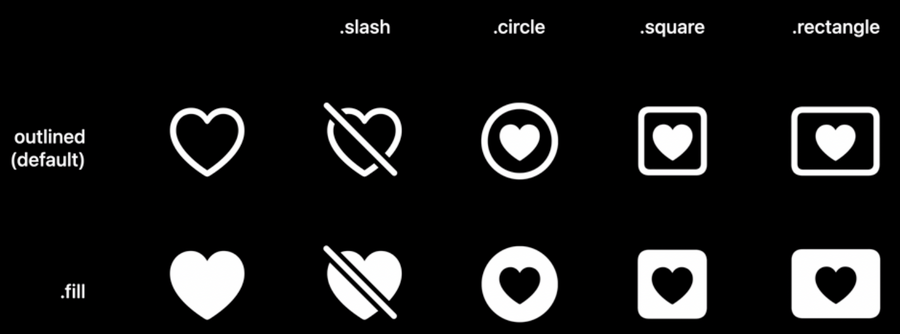
A symbol is defined as a representation of a symbolic value that is used for the purpose of communication. A symbol with the same representation can come in many different forms:
outlined - default in case of no context
filled - default for example in tab bars
slash - convey the functions of removing or displaying an item as inactive or unavailable
enclosing variants - which are symbols contained inside a shape like a circle, square, or rectangle
What to use where:
A filled symbol in swipe actions and iOS tab bars give a consistent appearance and level of emphasis, giving better control in areas that indicate selection when defined with an accent color
A symbol inside a circle with a filled variant provides better legibility at small sizes
An outlined, or default variant, of a symbol is great for Toolbars, Navigation Bars, Lists and other places in the UI where symbols are presented alongside text or where symbols need to display a uniform appearance.
New symbols
600 new symbols:
new Apple products (AirPods, homePods, ..)
video game controllers symbols
health-related
and more
Localization
All localized symbols and script variants adapt automatically based on the user’s device language, including right-to-left writing systems.
new symbols for Arabic, Hebrew, and Devanagari
included new variants for Thai, Chinese, Japanese, and Korean
Anatomy of a symbol
Symbols hierarchy
Every symbol groups its enclosed vectors of a path like layers
With annotations/layers, we can quickly identify a primary, secondary, and even tertiary layer of a symbol structure
Some symbols have all the (three) hierarchy levels.
Shapes that don’t touch or have a gap between the first and second element of a symbol are considered secondary
Shapes that do touch and are encapsulated inside one another, become tertiary
Rendering modes
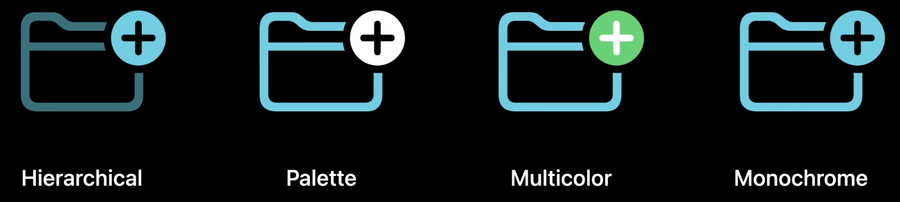
Four rendering modes:
Hierarchical (NEW)
uses a single color with varying opacities that add visual hierarchy to a symbol
creating depth and emphasis while allowing a single hue to drive the overall aesthetic
when multiple symbols that share common shapes are presented alongside one another, this rendering mode emphasizes the differences between them, intending to make the symbols more legible and recognizable.
Palette (NEW)
lets us define one color and opacity per hierarchy level
if a three-layers symbol only has two colors applied, the tertiary layer will use the same style as the secondary one
Multicolor
rendering mode that represents the intrinsic or native color of a symbol
many symbols feature this intrinsic color palette which is what’s rendered by default
when customized, each color can be assigned an arbitrary one
A symbol can be:
fully colored
partially colored, which means that part of a symbol will have the Multicolor feature, while the other will rely on an accent color
monochrome if it doesn’t contain any Multicolor information
Monochrome
most unified and consistent rendering mode
color and opacity is applied consistently in the whole symbol, no hierarchies
