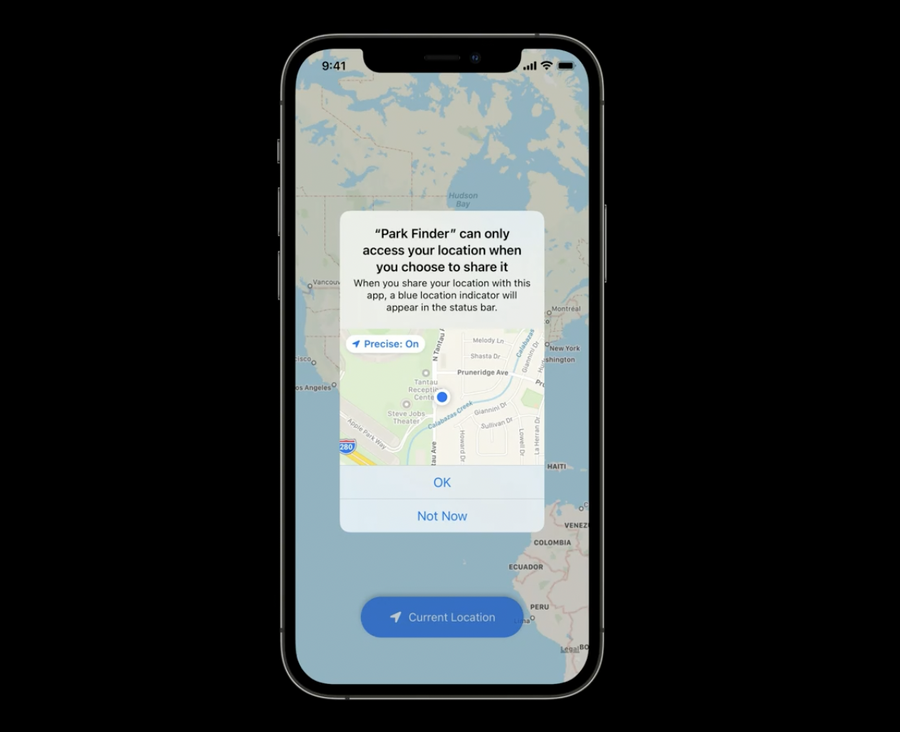
New quick authorization button:
CLLocationButtonfor UIKitLocationButtonfor SwiftUI
these buttons give your app Allow-Once authorization, without prompting user authorization every time it’s tapped
available on watchOS, iOS, macOS with Catalyst, and iPad apps on Mac
Customization
(UIKit) CLLocationButton
This is a UIButton with customizable parameters:
CLLocationButtonIconto set the type of the arrowCLLocationLabelto set the label of the buttoncornerRadiusto set the roundness of the buttonfontSizeto set the size of the label
(SwiftUI) LocationButton
LocationButton(.currentLocation) {
  // do something on button press...
}
.foregroundColor(.white)
.cornerRadius(15.0)
.labelStyle(.titleAndIcon)
.symbolVariant(.fill)
.tint(.blue)
Warning
Note that not all customization are possible, Xcode will warn you with log messages when the minimum requirements are not met, for example:
#locationButton rendering failed due to inappropriate sizes
#locationButton rendering failed due to Insufficient Alpha
#locationButton rendering failed due to contrastRatio between tintColor and backgroundColor insufficient
Prompt
If your app already have any kind of location authorization, then the button will work right away
If your app doesn’t have any permission yet, tapping the location button will trigger a one-time prompt (which won’t be shown again when tapped again), see below
this same prompt is shown if the user previously denied your app location permission access