
Terminology
Startup time (for the scope of this talk): time spent before the app
main()is executedLaunch Closure: all of the information necessary to launch an application (e.g., what dylibs the app uses, what the offsets in them are for various symbols, where their code signatures are).
Tips
Embed fewer dylibs
Declare fewer classes/methods
Use fewer initializers
Use more Swift
Swift avoids a lot of pitfalls that C, C++ and Objective-C allow you to do.
Swift does not have initializers.
Swift does not allow certain types of misaligned data structures that cost us time in launch
New tools to help find slow initializers
Use the Static Initializer tracer in instruments to profile your startup time:
initializers are code that have to run before
mainto set up objects for your appnew in iOS 11 and macOS High Sierra
provides precise timing for each static initializer
works across multiple dylibs, including system dylibs that may be taking a long time because of inputs you’ve given them, such as complicated nibs
Dynamic Linking Through the Ages
Originally dyld did not have version numbers, but Apple is retroactively giving them.
dyld 1.0 (1996–2004)
Shipped in NeXTStep 3.3
before dyld, NeXT used static binaries
Predated POSIX
dlopen()standardizeddlopenalready existed on some Unix systems, but were proprietary extensionsNeXTStep had different proprietary extensions
Released before most systems used large C++ dynamic libraries
C++ has a number of features, such as how its initializer ordering works. And one definition rule
worked well in a static environment
did not work with good performance in a dynamic environment
large C++ code bases cause the dynamic linker to have to do a lot of work and it was quite slow
Prebinding added in macOS Cheetah (10.0)
technology where macOS would try to find fixed addresses for every dylib in the system and for your application, and the dynamic loader would try to load everything at those addresses and if it succeeded, it would edit all of those binaries to have those precalculated addresses in it, and then the next time when it put them in the same addresses, it didn’t have to do any additional work
pro: prebinding sped up launch a lot
cons: prebinding was editing your binaries on every launch
dyld 2.0 (2004–2007)
Shipped in macOS Tiger
Complete rewrite
Correct C++ initializer semantics (extended the mach-o format and updated dyld so that we could get efficient C++ library support)
Full native
dlopen()/dlsym()semantics (deprecated legacy proprietary APIs)
Designed for speed
Limited sanity checking
It had security issues for speed’s sake (Apple went back and fix some of those)
Reduced prebinding
only edited the system library addresses
if you’ve ever seen the phrase
optimizing system performanceappear in your software update, that was added to the installer to be displayed during the time the system was updating prebinding (nowadays the message is used for all sort of optimizations)
dyld 2.x (2007–2017)
Many minor updates along the way:
More architectures support: x86, x86_64, arm, arm64
More platforms support: iOS, tvOS, watchOS
Improved security
Codesigning support
ASLR (Address Space Layout Randomization), which means that every time you loaded any library, they may be at a different address
bounds checking to a number of parts of the mach-o header (to void certain types of attach with malformed binaries)
Improved performance
Prebinding completely replaced by Shared Cache
Shared Cache
Introduced in iOS 3.1 and macOS Snow Leopard
It’s a single file that contains most system dylibs
since it’s just a single file, the system can do certain types of optimizations:
Rearranges binaries to improve load speed Pre-links dylibs (e.g. rearrange all of their text segments and all of their data segments and rewrite their entire symbol tables to reduce the size and to make it so we need to mount fewer regions in each process. It also allows us to pack binary segments and save a lot of RAM)
pre-links dylibs (on an average iOS system, this is the difference in about 500MB to 1GB of RAM at runtime)
pre-builds data structures used by dyld and ObjC (so we don’t have to do it on launch, saves both ram and time)
Built locally on macOS (when you see
optimizing system performance, the system is running an update on the dyld shared cache)Build at Apple and shipped with OS updates for all other Apple OS platforms
dyld 3 (2017)
Announced today
Complete rethink of dynamic linking
Will be on be the default for system apps for 2017 Apple OS platforms
Will completely replace dyld 2.x on Apple OS platforms (for all third-party apps as well)
Fully compatible with dyld 2.x
Key points:
performance
security
testability/reliability
Changes:
Move complex operations out of process (most of
dyldis now a regular daemon)the remaining bit of
dyldthat stays in process is as small as possible, thus reducing the attack surface in your applicationsspeeds up launch
How dyld 2 and dyld 3 launch an app
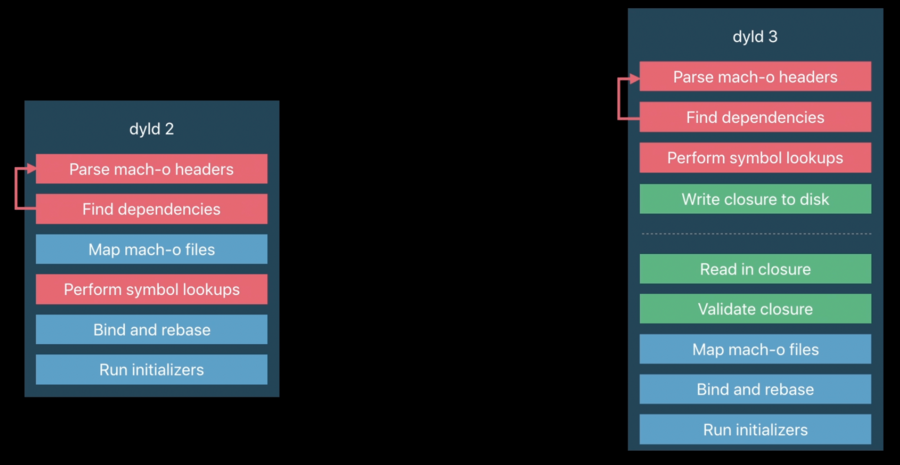
dyld 2
parse app mach-o header
find all dependencies/libraries (parse those library mach-o headers, repeat if those libraries depend on other libraries)
repeat steps above until we have a complete graph of all your dylibs
map mach-o files (so the system gets all libraries into your app address space)
perform symbol lookups (for each API the app uses, the system essentially copies that into a function pointer in your application)
bind and rebase (ASLR)
run initializers
call your app main
dyld 3
dyld has three components:
out of process mach-o parser and compiler
parses the app mach-o headers and solve all app dependencies
performs symbols lookups
the outcome is then cached in a closure to disk
this is possible because:
dependencies don’t change between launches
symbol locations within a mach-o do not change between launches
in-process engine that runs launch closure
launch closure caching service
Most launches use the cache and never invoke the out-of-process mach-o parser/compiler
The typical launch becomes:
read in closure
validate closure
map mach-o files (so the system gets all libraries into your app address space)
bind and rebase (ASLR)
run initializers
call your app main
dyld 3 architecture
Three components:
Out of process mach-o parser and compiler
Small in-process engine
Launch closure caching service
Out of process mach-o parser
Is a normal daemon that can use normal testing infrastructure.
Resolves all search paths, @rpaths, environment variables
Parses the mach-o binaries
Performs all symbol lookups
Creates a launch closure with results
Small in-process engine
This is the part that runs in the app process.
Validates launch closure
Maps in all dylibs
Applies fixups
Runs initializers
Jumps to
main()
It never needs to parse mach-o headers or access the symbol tables
Launch closure caching service
System app launch closures built into shared cache
Third-party app launch closures built during install
Rebuilt during software update (by default these will all be prebuilt for you on iOS and tvOS and watchOS before you even run)
On macOS the in-process engine can call out to a daemon if necessary
on first launch and/or after an OS update
necessary because of app side loading
Not necessary on other Apple OS platforms
