
Text Effects (iOS 7)
We can obtain many text effects via the attribute (of a NSAttrributedString) NSTextEffectAttributeName.
Just checked: it’s 2018 (5 years later) and the only effect is still just
NSAttributedString.TextEffectStyle.letterpressStyle
The Trio
In TextKit, there are three classes that are used to represent the text in the app and turn it into glyphs which users will see on screen.
NSTextStorage
Provides the backing store for the text in the app.
It’s a
NSMutableAttributedStringsubclass: it controls the text unicode characters, attributes etc
NSLayoutManager
Manages how that text gets turned into glyphs and has customizable override points.
It takes the given text (from
NSTextStorage) and translates it into glyphs on screen.(Via delegation) We can accomplish advanced layout techniques such as folding lines or other advanced text rendering.
NSTextContainer
Describes the geometry about which the flow lines and line fragments in your text view.
Represents one area on the display in which you’d like to draw a text.
What is a text container?
A text container defines a coordinate system and geometry for an NSLayoutManager.
Exclusion paths live entirely in the NSTextContainer’s coordinate space.
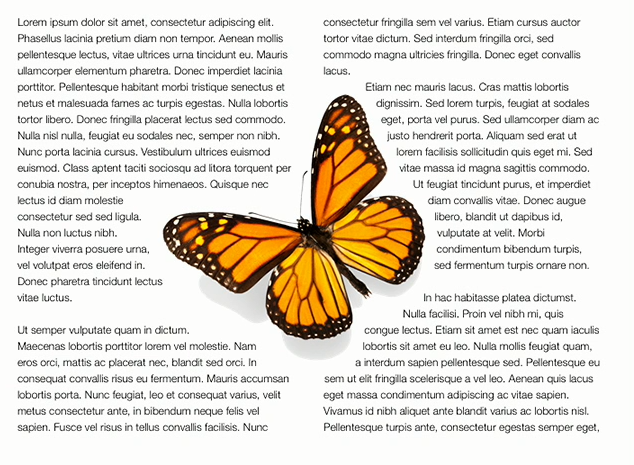
It does not do the actual drawing, that’s up to your text view.
Hit-testing is also done in the NSTextContainer’s coordinate space.
Hit testing returns the glyph that was tapped:
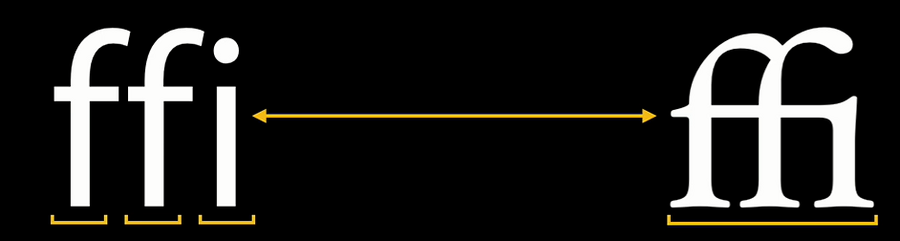
Above: Three characters, one glyph.
Note: one glyph is not a one-to-one mapping from a glyph to a set of characters or vice-versa.
Therefore we need to use the NSLayoutManager conversion:
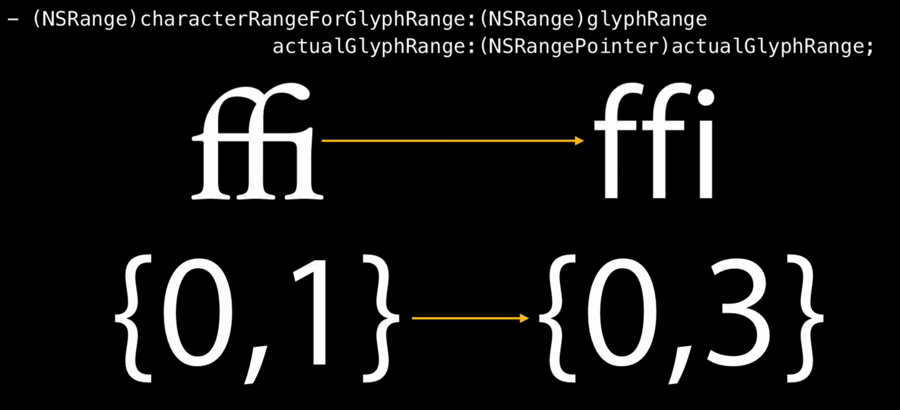
This works chars to glyphs, too.

One NSLayoutManager can have multiple NSTextContainer, this is how we get multipage and multi column support almost for free.
With NSLayoutManager we can:
get the exact position and
sizeofeach single character 😍 (more precisely, of the glyph, which is font + character) and lineModifying line spacing
Validating soft line breaking
Custom glyph mapping
More info here.
