
UIView animation APIs Overview
Basic API
Before iOS 4 we had the following APIs:
+ (void) beginAnimations:context:
+ (void) commitAnimations
iOS 4 introduced block-based APIs:
+ (void)animateWithDuration:(NSTimeInterval)duration
                      delay:(NSTimeInterval)delay
                    options:(UIViewAnimationOptions)options
                 animations:(void (^)(void))animations
                 completion:(void (^)(BOOL finished))completion;
Relationship to core animation:
animateWithDuration:animations:completion:lets us update our view properties within theanimationsblockall iOS/UIkit views are backed by
CALayers, hence changing aUIViewproperty is really changing aCALayerpropertywhen we change something within the
animationsblock,CAAnimationobjects get added to each layer (whose property we’re changing), and that’s actually what’s driving the animations that you see throughout iOS.
Disabling animations
In case we’re somehow within an animations block or similar, and we don’t want to animate a property change, we have the following API:
(void)setAnimationsEnabled:(BOOL)Which we need to remember to set back the value to true for other properties to animate. From iOS 7 we have a newer and recommended block-based API for this:
(void)performWithoutAnimation:(void ^(void))actions;Spring animations
Same as the basic animation, with two extra parameters:
Damping ratio
Initial Spring Velocity
+ (void)animateWithDuration:(NSTimeInterval)duration
                      delay:(NSTimeInterval)delay
     usingSpringWithDamping:(CGFloat)dampingRatio
      initialSpringVelocity:(CGFloat)velocity
                    options:(UIViewAnimationOptions)options
                 animations:(void (^)(void))animations
                 completion:(void (^)(BOOL finished))completion;
Key-frame animations
Equivalent to CAKeyframeAnimation. We have two methods.
The first is to create the animation block as usual:
+ (void)animateKeyframesWithDuration:(NSTimeInterval)duration
                               delay:(NSTimeInterval)delay
                             options:(UIViewKeyframeAnimationOptions)options
                          animations:(void (^)(void))animations
                          completion:(void (^)(BOOL finished))completion;
The second is to add the actual key frames:
+ (void)addKeyframeWithRelativeStartTime:(double)frameStartTime
                        relativeDuration:(double)frameDuration
                              animations:(void (^)(void))animations
Example usage:
[UIView animateKeyframesWithDuration: .35
                               delay: 0.0
                             options:0
                          animations:^{
                                       [UIView addKeyframe... animations: ^{...}];
                                       [UIView addKeyframe... animations:^{...}];
                                       [UIView addKeyframe... animations:^{
                                         [someView setPosition:...];
                                          // etc.
                                        }];
                                      }
                        completion:^(BOOL finished) {...}];
Custom view controller transitions
Which transitions can be customized?
Presentations and dismissals
UITabBarControllerUINavigationControllerUICollectionViewControllerlayout-to-layout transitions
Presentations and dismissals
Supported presentation styles:
UIModalPresentationFullScreenUIModalPresentationCustom
The difference between the two is that in .custom the from view controller is not removed from the window hierarchy after the transition.
How to:
UIViewController *vc = ...;
id <UIViewControllerTransitioningDelegate> transitioningDelegate;
vc.modalPresentationStyle = UIModalPresentationCustom;
[vc setTransitioningDelegate: transitioningDelegate];
[self presentViewController:vc animated: YES completion: nil];
UITabBarController & UINavigationController
How to: set a delegate that vends the transition object
// in your UITabBarController subclass
NSUInteger secondTab = 1;
self.delegate = tabBarControllerDelegate;
[self setSelectedIndex:secondTab]; // this will use custom transition if `tabBarControllerDelegate` vends it

// in your UINavigationController subclass
self.delegate = navigationControllerDelegate;
[self pushViewController:vc animated:YES];
Note that you don’t need to subclass like in the example, you can use the default classes and assign the delegate.
UICollectionViewController
Layout-to-layout navigation transitions
UICollectionViewLayout *layout1,*layout2,*layout3;
UICollectionViewController *cvc1, *cvc2, *cvc3;
cvc1 = [cvc1 initWithCollectionViewLayout:layout1];
...
[nav pushViewController:cvc1 animated:YES];
cvc2.useLayoutToLayoutNavigationTransitions = YES; // you must set these to get your transition
cvc3.useLayoutToLayoutNavigationTransitions = YES; // you must set these to get your transition
[nav pushViewController:cvc2 animated:YES];
[nav pushViewController:cvc3 animated:YES];
[nav popViewControllerAnimated:YES];
Anatomy of a transition
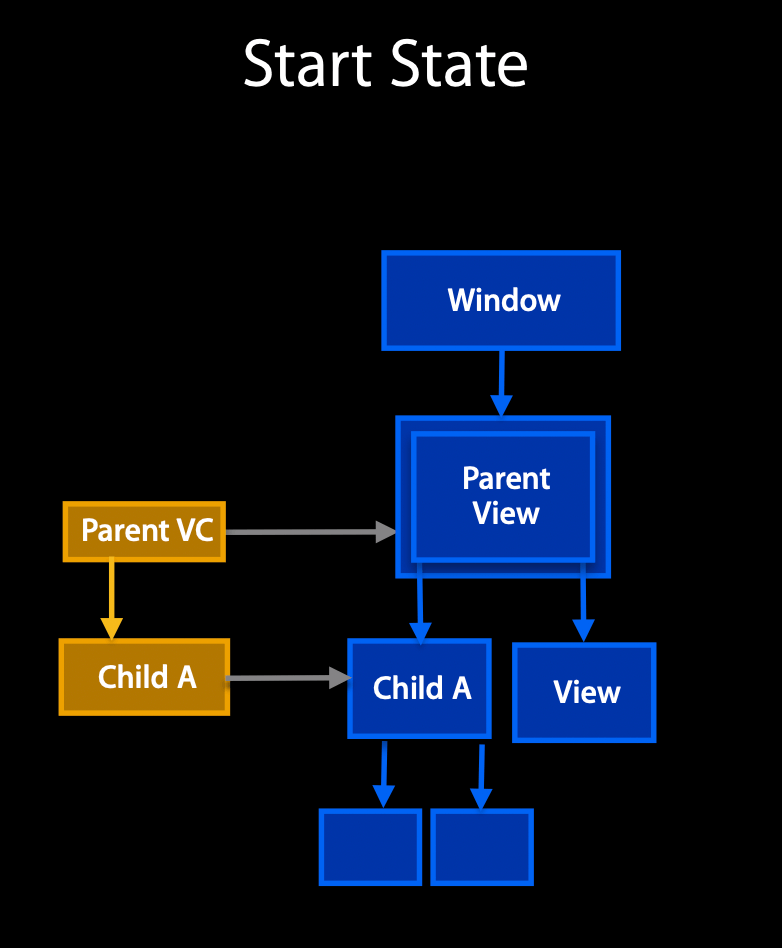
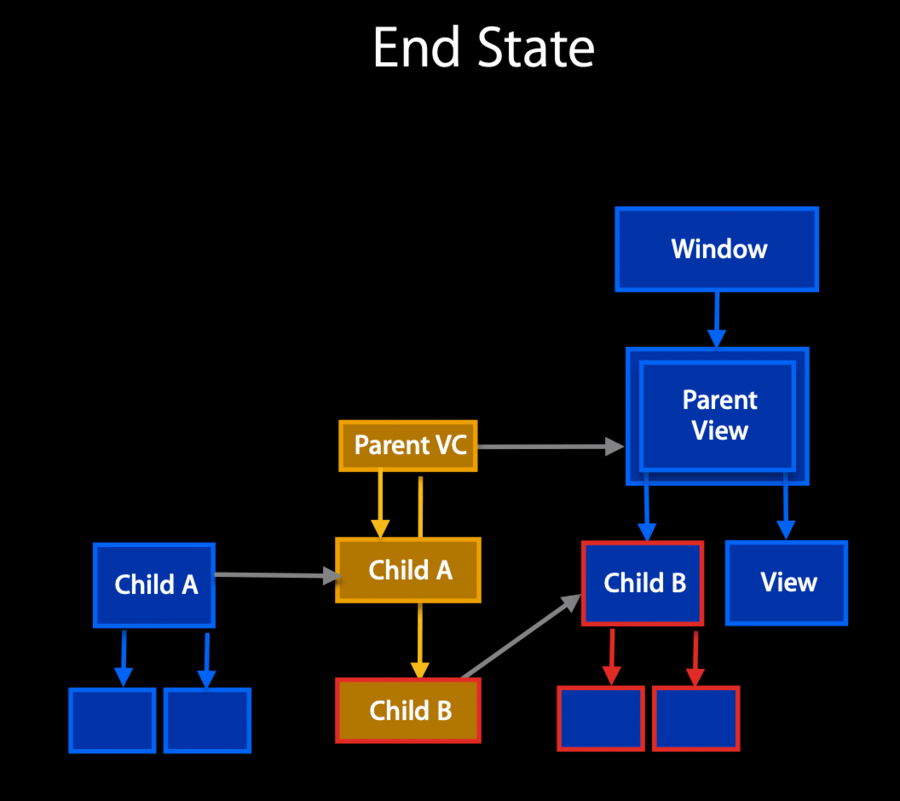
In this transition, we replace the Child A view with a different Child B view:
 |  |
|---|
Blue is the view hierarchy, yellow is the view controller hierarchy
By definition, the start state and end state have both a view controller hierarchy and view hierarchy that are consistent.
However, during the transition between these states (the actual move from one to the other), we go through an inconsistent phase. For example, at some point we probably have both Child A and Child B views in the view hierarchy, maybe with some animations happening etc.
This can be considered a summary of what happens during a transition:
Start state (consistent view controller hierarchy and view hierarchy)
User or programmatic transition commences
Internal structures are updated, callbacks made, etc.
Container view, and start and final view positions are computed
Optional animation to end state view hierarchy is run
Animation completes (internal structures are updated, callbacks made, etc.)
End State (consistent view controller hierarchy and view hierarchy)
UIViewControllerContextTransitioning
From iOS 7, we have a new definition that takes care of points 4 and 6: UIViewControllerContextTransitioning.
@protocol UIViewControllerContextTransitioning <NSObject>
  // The view in which the animated transition should take place.
  - (UIView *)containerView;

  // Two keys for the  method below are currently defined by the system
  // UITransitionContextToViewControllerKey, and UITransitionContextFromViewControllerKey.
  - (UIViewController *) viewControllerForKey:(NSString *)key;
  - (CGRect) initialFrameForViewController:(UIViewController *)vc;
  - (CGRect) finalFrameForViewController:(UIViewController *)vc;
  // 👆🏻 It's important to start and end from where the system wants you to start and end.

  // This MUST be called whenever a transition completes (or is cancelled.)
  - (void)completeTransition:(BOOL)didComplete;
  ...
@end
Note that we do not conform or create objects conforming to this protocol: it’s UIKit that does this for us. Instead, an object conforming to this protocol will be passed to us to create and vend to create your custom transitions.
UIViewControllerAnimatedTransitioning
One object that we can define and where an UIViewControllerContextTransitioning object will be passed to is an object conforming to UIViewControllerAnimatedTransitioning:
@protocol UIViewControllerAnimatedTransitioning <NSObject>
  // Here we tell how long the transition is going to take.
  - (NSTimeInterval)transitionDuration:(id <UIViewControllerContextTransitioning>)ctx;

  // This method can only  be a nop if the transition is interactive and not a
  // percentDriven interactive transition.
  // Here we define the transition.
  - (void)animateTransition:(id <UIViewControllerContextTransitioning>)ctx;
  // 👆🏻 when this is called we need to:
  // 1. add the view into the parent view
  // 2. do our animation
  // 3. call `UIViewControllerContextTransitioning`'s completeTransition:

  @optional
  // This is a convenience and if implemented will be invoked by the system when the
  //transition context's completeTransition: method is invoked.
  - (void)animationEnded:(BOOL) transitionCompleted;
@end
Pseudo code for animateTransition::
- (void)animateTransition:(id <UIViewControllerContextTransitioning>ctx {
  UIView *inView = [ctx containerView];
  UIView *toView = [[ctx viewControllerForKey: ...]  view];
  UIView *fromView = [[ctx viewControllerForKey: ...] view];
  CGSize size = toEndFrame.size;

  if(self.isPresentation) {
    ...
    [inView addSubview: toView];
  } else {
    ...
    [inView insertSubview:toView belowSubview: [fromVC view]];
  }

  // 👇🏻 Do the animation here
  [UIView animateWithDuration: self.transitionDuration animations: ^ {
    if(self.isPresentation) {
      toView.center = newCenter;
      toView.bounds = newBounds;
    } else {
      ...
    }
  } completion: ^(BOOL finished) { [ctx completeTransition: YES];}];
}
Wiring it all together
Animation and interaction controllers are vended by delegates
UIViewControllerTransitioningDelegateUINavigationControllerDelegateUITabBarControllerDelegate
Animation controllers conform to
UIViewControllerAnimatedTransitioningInteraction controllers conform to
UIViewControllerInteractiveTransitioningA system object passed to the controllers conforms to
UIViewControllerContextTransitioning
Animation and interaction controllers are vended by delegates
UIViewControllerTransitioningDelegate
We vend our animated/interactive transition via this delegate:
@protocol UIViewControllerTransitioningDelegate <NSObject>
  // for animated but not interactive:
  @optional
  - (id <UIViewControllerAnimatedTransitioning>)
      animationControllerForPresentedController:(UIVC *)presented
                            presentingController:(UIVC *)presenting
                                sourceController:(UIVC *)source;
  - (id <UIViewControllerAnimatedTransitioning>)
      animationControllerForDismissedController:(UIVC *)dismissed;

  // for animated and interactive:
  - (id <UIViewControllerInteractiveTransitioning>)
      interactionControllerForPresentation:(id <UIViewControllerAnimatedTransitioning>)a;
  - (id <UIViewControllerInteractiveTransitioning>)
      interactionControllerForDismissal:(id <UIViewControllerAnimatedTransitioning>)a;
@end
..which we set in the presented view controller (not the presenting view controller):
@interface UIViewController(CustomTransitioning)
  @property (nonatomic,retain) id <UIViewControllerTransitioningDelegate>transitionDelegate;
@end
UINavigationControllerDelegate
Similar to above, here are the new UINavigationControllerDelegate extensions:
// animated but not interactive:
- (id <UIViewControllerAnimatedTransitioning>)navigationController:  (UINC *)nc
                                   animationControllerForOperation: (UINavigationControllerOperation)op
                                                fromViewController:(UIViewController *)fromVC
                                                  toViewController:(UIViewController *)toVC;
// animated and interactive:
- (id <UIViewControllerInteractiveTransitioning>)navigationController: (UINC *)nc
                          interactionControllerForAnimationController: (id <UIViewControllerAnimatedTransitioning>)a;
UITabBarControllerDelegate
Here are the new UITabBarControllerDelegate extensions:
// animated but not interactive:
- (id <UIViewControllerAnimatedTransitioning>)tabBarController: (UITABC *)tbc
            animationControllerForTransitionFromViewController:(UIVC *)fromVC
                                              toViewController:(UIVC *)toVC;
// animated and interactive:
- (id <UIViewControllerInteractiveTransitioning>)tabBarController: (UITABC *)tbc
                      interactionControllerForAnimationController: (id <UIViewControllerAnimatedTransitioning>)a;
Responsibilities of the animation controller
Implementation of
animateTransition:andtransitionDuration:Insertion of to view controller’s view into the container view
When the transition animation completes
The to and from view controller’s views need to be in their designated positions
The context’s
completeTransition:method must be invoked
Interactive View Controller Transitions
Like before, but interactive
If you use a
UIViewanimation APIs in youranimateTransitionmethod, UIKit will take care of reversing the animation, cancelling it, etc.UIKit provides a concrete interaction controller class:
UIPercentDrivenInteractiveTransition
UIViewControllerInteractiveTransitioning
Equivalent to UIViewControllerAnimatedTransitioning, but interactive.
@protocol UIViewControllerInteractiveTransitioning <NSObject>
  // fell free to call out to your animation controller's animate transmission here
  - (void)startInteractiveTransition:(id <UIViewControllerContextTransitioning>)ctx;

  // When the transition stops, you can use these parameters to tell the animation to speed up/slow down
  // and also change the animation curve.
  @optional
  - (CGFloat)completionSpeed;
  - (UIViewAnimationCurve)completionCurve;
@end
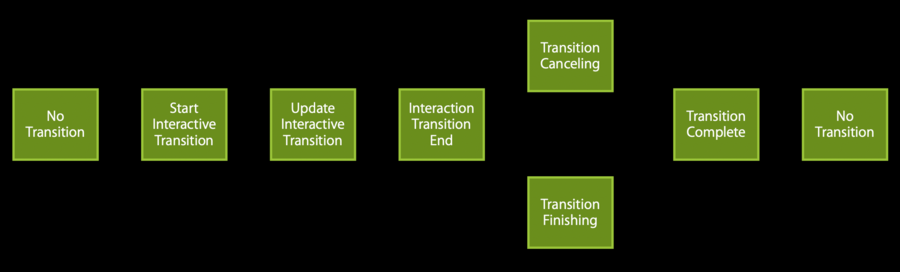
Interactive Transitioning States
How-to
Implement the animation controller
animatePresentation:must be implemented using theUIViewanimation block APIs
Implement the logic that will drive the interaction (e.g. The target of a gesture recognizer)
Often this target is a subclass of
UIViewControllerPercentDrivenTransitionThe interaction logic will call:
updateInteractiveTransition:(CGFloat)percentcompleteInteractiveTransitionorcancelInteractiveTransition(Note that
startInteractiveTransitionis handled automatically)
UIPercentDrivenInteractiveTransition
// The associated animation controller must animate its transition using UIView animation APIs.
@interface UIPercentDrivenInteractiveTransition : NSObject <UIViewControllerInteractiveTransitioning>
  @property (readonly) CGFloat duration;
  // The last percentComplete value specified by updateInteractiveTransition:
  @property (readonly) CGFloat percentComplete;
  // completionSpeed defaults to 1.0 which corresponds to a completion duration of
  // (1 - percentComplete)*duration.  It must be greater than 0.0.
  @property (nonatomic,assign) CGFloat completionSpeed;
  // When the interactive part of the transition has completed, this property can
  // be set to indicate a different animation curve.
  @property (nonatomic,assign) UIViewAnimationCurve completionCurve;

  //👇🏻 These are the three methods that you're going to call.
  // Used instead of the corresponding context methods.
  - (void)updateInteractiveTransition:(CGFloat)percentComplete;
  - (void)cancelInteractiveTransition;
  - (void)finishInteractiveTransition;
@end
Canceling an interactive transition
Don’t assume that
viewDidAppearfollowsviewWillAppearbecause of interactive transactions, our view controller might jump between appearing (
viewWillAppear) and disappearing (viewWillDisappear) without actually appearing and disappearing
Make sure to undo any side effects
Any view controller can ask for the transition coordinator (doesn’t matter which view controller, as long as they’re involved in a transition)
@interface UIViewController(TransitionCoordinator)
@property (nonatomic,retain) id <UIViewControllerTransitionCoordinator> transitionCoordinator;
@end
This coordinator conforms to UIViewControllerTransitionCoordinator which, in turn, conforms to UIViewControllerTransitionCoordinatorContext:
@protocol UIViewControllerTransitionCoordinator
                      <UIViewControllerTransitionCoordinatorContext>
  @optional
  - (BOOL) notifyWhenInteractionEndsUsingBlock:(void (^ (id<UIViewControllerTransitionCoordinatorContext)handler;
  - (BOOL) animatorAlongsideTransition:(void (^) (id <UIViewControllerTransitionCoordinatorContext)a;
                            completion:(void (^)(id<UIViewControllerTransitionCoordinatorContext)c;
  - (BOOL) animatorAlongsideTransitionInView:(UIView *)view
                                   animation: (void (^) (id <UIViewControllerTransitionCoordinatorContext)a;
@end

@protocol UIViewControllerTransitionCoordinatorContext <NSObject>
  - (UIView *)containerView;
  - (UIViewController *) viewControllerForKey:(NSString *)key;
  - (CGRect) initialFrameForViewController:(UIViewController *)vc;
  - (CGRect) finalFrameForViewController:(UIViewController *)vc;
  - (BOOL) isCancelled;
  - (BOOL) initiallyInteractive;
  - (BOOL) isInteractive;
@end
Your view controller can use these properties of the coordinator to keep track of its own appearing/disappearing state. For example:
- (void) viewWillAppear: {
  [self doSomeSideEffectsAssumingViewDidAppearIsGoingToBeCalled];
  id <UIViewControllerTransitionCoordinator> coordinator;
  coordinator = [self transitionCoordinator];
  if(coordinator && [coordinator initiallyInteractive]) {
    [transitionCoordinator notifyWhenInteractionEndsUsingBlock:
      ^(id <UIViewControllerTransitionCoordinatorContext> ctx) {
        if(ctx.isCancelled) {
          [self undoSideEffects];
        }
      }];
  }
}
transitionCoordinator does even more:
Allows completion handlers to be registered for transitions
Allows other animations to run alongside the transition animation • In addition to custom transitions on iOS 7
UINavigationControllertransitions have an associated transition coordinatorPresent and Dismiss transitions have an associated coordinator
Usage example:
UIViewController *vc;
[self pushViewController:vc animated: YES];
id <UIViewControllerTransitionCoordinator>coordinator;
coordinator = [viewController transitionCoordinator];
[coordinator animateAlongsideTransition:
  ^(id <UIViewControllerTransitionCoordinatorContext> c) {
    ;;; some animation
  }
  completion:(id <UIViewControllerTransitionCoordinatorContext> c) {
    ;;; Code to run after your push transition has finished.
}];